
Speed Logic6.8 - Google Play
You'll be able to see results in few seconds.
Publisher Description
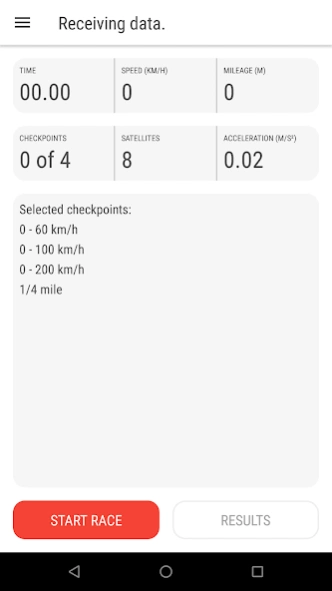
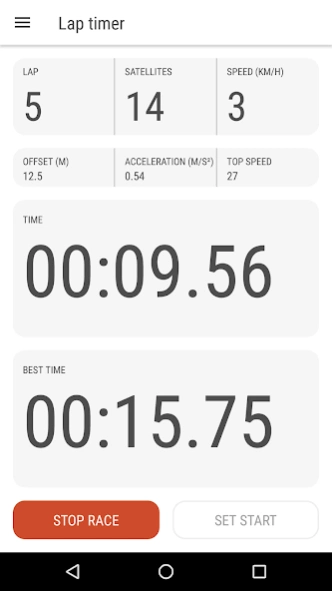


Measure top speed and acceleration of your vehicle. Lap Timer and Speedometer.
Measure top speed, acceleration, braking and best lap time of your vehicle.
Easy way to know 0-100 km/h, 0-60 mph, quarter mile and other checkpoints. You can add your own checkpoint as well. Save your results to PDF and share it via WhatsApp, Telegram, Viber, email or any way you want.
In Lap Timer mode you can check your best and current lap time and export results to file. This feature best for external Bluetooth and USB GPS receivers.
Speed Logic supports various types of external Bluetooth and USB GPS/GLONASS receivers such as Racelogic VBox Sport 20Hz, UBlox USB 6x, 7x and 8x series dongles with refresh rate up to 20 Hz, QSTARZ 5 and 10Hz receivers, Garmin, GlobalSat and other gadgets with NMEA 0183 standart. Also you can use OBD ELM327 Wi-Fi and Bluetooth adapters connected direct to your vehicle.
Speed Logic designed for any devices with various screen resolutions including car head units, mobile phones, notebooks, 7" and 10" tablets.
Use Speed Logic as a handy speedometer with number of extra features such as instant mileage and speed in kilometers, miles or knots, thermometer in Celsius and Fahrenheit, atmospheric pressure and humidity, satellite connection info, clock and battery level.
Lightweight, ad-free and easy to use. Works even on old models with small displays.
Speed Logic do not track you and do not collect any personal data.
Android 8.1 Oreo ready.
Whant to add your device to app?
Need more info or help?
Please visit our website https://SpeedLogicApp.com
About Speed Logic
The company that develops Speed Logic is Speed Logic Software. The latest version released by its developer is 6.8.
To install Speed Logic on your Android device, just click the green Continue To App button above to start the installation process. The app is listed on our website since 2019-07-01 and was downloaded 0 times. We have already checked if the download link is safe, however for your own protection we recommend that you scan the downloaded app with your antivirus. Your antivirus may detect the Speed Logic as malware as malware if the download link to com.speedlogicapp.speedlogic is broken.
How to install Speed Logic on your Android device:
- Click on the Continue To App button on our website. This will redirect you to Google Play.
- Once the Speed Logic is shown in the Google Play listing of your Android device, you can start its download and installation. Tap on the Install button located below the search bar and to the right of the app icon.
- A pop-up window with the permissions required by Speed Logic will be shown. Click on Accept to continue the process.
- Speed Logic will be downloaded onto your device, displaying a progress. Once the download completes, the installation will start and you'll get a notification after the installation is finished.
Program Details
System requirements
Download information
Pricing
Version History
version 6.8
posted on 2019-07-01
1) Added auto start after finish.
2) Work in background without disconnecting from GPS.
3) Setting up a race start detection - by GPS, accelerometer or GPS and acc together.
4) Support for Racebox Pro and FreeLogic WiFi devices.
5) Switch between fullscreen and normal view.
6) Screen rotation 360 degrees.
7) Bluetooth devices displays with MAC addresses.
8) Updated USB, OBD and Bluetooth components.
9) Adjusting threshold of accelerometer and GPS.
10) Android 10 Q ready.
version 5.6
posted on 2018-01-09
1) Save race and lap statistics to PDF and share with messengers, email, DropBox or Bluetooth.
2) Improved compatibility with new Android devices.
3) Now you can find out max speed of your vehicle using new screen - Top Speed.
4) Updated Lap Timer. Check out your best Lap Time and share with friends.
5) Android 8.1 Oreo ready.
6) Improved work with external Bluetooth GPS receivers.
7) Fixed minor bugs and made changes suggested by app users.
version 4.5
posted on 2016-09-26
1) Android 7 Nougat ready.,2) Now Speed Logic Lite ad-free.,3) You can enable or disable sound alert in Races.,4) Fixed minor bugs and made changes suggested by app users.,5) Design and user experience improvements.
Disclaimer
Official Google Play Link
We do not host Speed Logic on our servers. We did not scan it for viruses, adware, spyware or other type of malware. This app is hosted by Google and passed their terms and conditions to be listed there. We recommend caution when installing it.
The Google Play link for Speed Logic is provided to you by apps112.com without any warranties, representations or guarantees of any kind, so access it at your own risk.
If you have questions regarding this particular app contact the publisher directly. For questions about the functionalities of apps112.com contact us.
